Realistic Ragdoll MMA PC Controls (Keyboard & Mouse)
Every verified Realistic Ragdoll MMA PC control for keyboard and mouse in one dedicated keybind reference, from jabs and hooks to slips, blocks, and ground slots.
PC keyboard & mouse keybinds: WASD (Move), Mouse (Aim), LMB (Jab), RMB (Cross), Q/E (Hooks), R/T (Kicks), W + Space (Flying Knee), Left Shift (Block), F + A/D (Slip), G (Takedown), Space (Scramble/Sprawl), and 1–4 (Ground Slots).
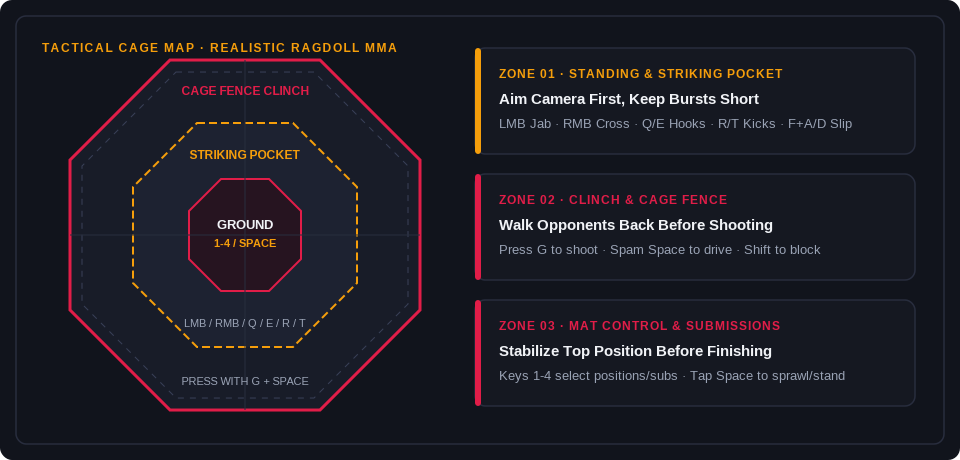
PC Controls (Keyboard and Mouse)
On PC, your mouse camera is just as important as your attack keys. Because strikes travel along your facing angle and momentum vector, turning your camera slightly into a hook or kick adds cleaner contact and reduces awkward ragdoll glancing blows.
| Move / Action | PC Keybind | Tactical Use |
|---|---|---|
| Move Fighter | W, A, S, D |
Control octagon spacing and circle off the cage fence |
| Aim Strikes & Camera | Mouse |
Direct hits toward the head, torso, or lead knee |
| Jab | Left Click (LMB) |
Fast low-stamina opener to check distance |
| Cross | Right Click (RMB) |
Straight power punch after a jab or defensive slip |
| Left Hook / Right Hook | Q / E |
Close-range pocket power shots; steer camera into the arc |
| Lead Kick / Oblique Kick | R |
Mid-range lead leg strike or knee-level oblique stop kick |
| Rear Kick | T |
Heavy body or high kick when opponents leave space |
| Flying Knee | W (Forward) + Space |
Fast gap-closing opener that disrupts upright posture |
| Block / Check Kicks | Hold Left Shift |
Absorb flurries and check incoming leg or body kicks |
| Slip / Duck | F + A or D |
Evade straight punches and create whiff-punish windows |
| Takedown / Clinch Input | G |
Grappling entry key (see full grappling guide for follow-ups) |
| Scramble / Sprawl Key | Space |
Context-sensitive mat and clinch scramble input |
| Ground Slots | 1, 2, 3, 4 |
Ground position and submission selection keys |
If you want to build muscle memory for Q, E, R, T, F, G, Shift, and Space without losing Casual or Ranked fights, try our browser-based Realistic Ragdoll MMA Keybind Trainer. For blocking, slipping (F + A/D), guard breaks, and counter timing, read our dedicated Parry, Block & Counter Guide.
Mobile Controls (iOS & Android Touch HUD)
Playing on a phone or tablet instead of keyboard and mouse? We moved the full landscape touch HUD map, virtual thumbstick guide, and iOS/Android lag fixes into our dedicated Realistic Ragdoll MMA Mobile Controls Guide.
Xbox and PS5 Controller Controls
Using an Xbox or PlayStation DualSense gamepad via Roblox native controller support? See our dedicated Xbox & PS5 Controller Guide for connection steps, reported button layouts, and in-game verification tips.
Common PC Input Setup Issues and Where to Learn More
1. Punches Whiffing Past the Target
In Realistic Ragdoll MMA, standing slightly off-angle makes jabs and hooks slide past an opponent's shoulder. Adjust your mouse camera before pressing Q, E, or RMB so your facing direction lines up cleanly.
2. Grappling Timing and Ground Escapes
Knowing the keys (G, Space, and 1–4) is only step one—landing fence takedowns, sprawling against shots, and standing up safely from bottom position are covered in full on our dedicated Grappling & Submissions guide.
3. Stamina Drain and Progression Without Codes
Holding attacks non-stop empties your stamina bar in seconds. Once your PC keys feel comfortable, read our combos and stamina tips to pace full rounds cleanly, and verify live promo status on our Realistic Ragdoll MMA codes page before wasting time hunting shortcuts.
Frequently Asked Questions
Which PC keys block and slip punches in Realistic Ragdoll MMA?
Hold Left Shift on PC to block incoming flurries and check kicks, and press F plus A or D on PC to slip straight punches off the centerline before countering with RMB.
Read the full Parry, Block & Counter Guide →What PC key is Flying Knee in Realistic Ragdoll MMA?
Hold W to move forward and press Space on PC to trigger a Flying Knee. Time it as your opponent steps forward so the knee disrupts their upright posture cleanly.
Where can I find the mobile touch HUD and Xbox/PS5 controller guides?
Yes—dedicated button layouts and setup tips for iOS/Android touchscreens and Xbox/PS5 gamepads live on their own pages so this page stays focused on PC keyboard and mouse inputs.
Open Mobile Controls Guide →Where can I learn how to land takedowns and stand up from the mat?
Takedown entry timing (G + Space), sprawling, and standing up from bottom position depend on cage spacing and scramble rhythm rather than a single button tap. See the full breakdown on our Grappling & Submissions page.
Read the Grappling & Submissions guide →
No player notes yet. Drop the first combo tip or ask about a control setup above.