Realistic Ragdoll MMA Grappling, Takedowns & Submissions Guide
Control the octagon mat in Realistic Ragdoll MMA: learn G + Space takedown entries, cage-fence pressure, top-control ground-and-pound, sprawls, and keys 1–4 submissions.
Press G at close range and spam Space to drive an opponent down to the mat; repeatedly tap Space to sprawl against shots or stand up from bottom position, and use keys 1–4 from top control to transition or lock submissions.
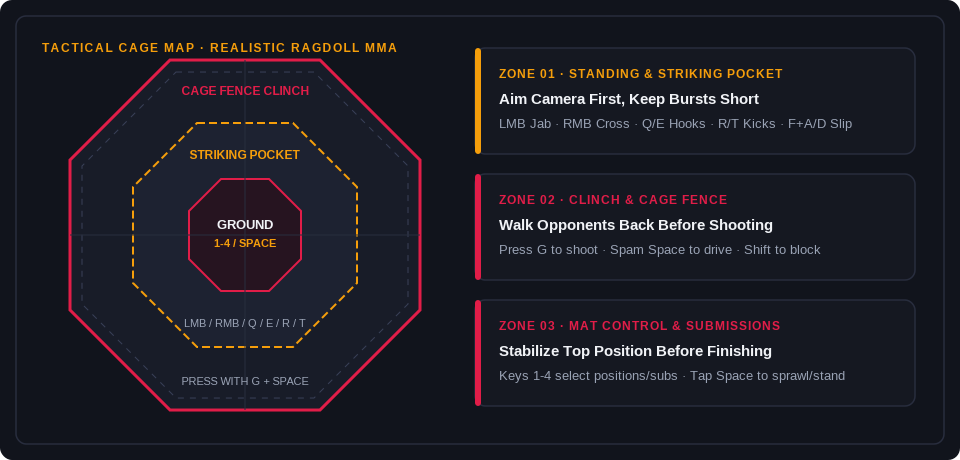
How Takedowns Work in Realistic Ragdoll MMA
In a physics-driven fighting game, takedowns do not snap automatically across the cage. Your ragdoll model has to make clean contact with the opponent's center of gravity while carrying forward momentum. Half-hearted grabs thrown from mid-range telegraph your movement and leave your head open to a straight cross or a flying knee.
Follow this three-step wrestling sequence on PC (or mirror it with the GRAB button on mobile and RB/R1 on controller):
- Create the Entry Window: Either walk your opponent backward toward the cage fence or absorb one of their heavy kicks with
Left Shift(Block). - Initiate the Shot or Clinch: Step inside punching range and press
Gonce cleanly—do not panic-mashGfrom outside striking range. - Drive to the Canvas: As soon as you connect, repeatedly tap
Spaceto overpower their base and drive them down to the mat.
Why Fence Pressing Doubles Your Takedown Rate
Open-mat takedowns give your opponent space to backpedal or sprawl cleanly. Pressing your opponent toward the octagon wall changes the physics immediately:
- No Back-Out Room: Against the cage fence, their ragdoll cannot slide backward out of your clinch hitbox.
- Interrupted Striking Rhythm: Fighters pinned near the fence struggle to set up full-momentum rear kicks (
T) or flying knees (W+Space). - Cleaner Top Landing: Completing a
G+Spacedrive against the wall consistently puts you directly into dominant top control instead of an awkward neutral scramble.
Pair your fence pressure with short jab-cross bursts from our combos and stamina guide so your opponent covers up with Left Shift, making it much harder for them to stuff your level change.
Ground Control, Ground-and-Pound, and Submissions (Keys 1–4)
Once the fight hits the mat, calm pacing beats frantic button mashing every time. Your stamina bar still governs how strongly you can hold top position and land strikes.
| Ground Phase | Primary Input (PC) | What to Do |
|---|---|---|
| Pin & Hold Top Control | Tap Space |
Prevent bottom fighter from bridging or standing back up |
| Soften Up Opponent | Controlled strikes | Drain their health and daze their ragdoll before going for a lock |
| Positional Transitions & Submissions | Keys 1, 2, 3, 4 |
Pick dominant positions (Mount, Back Control) or lock in a submission |
| Defend / Escape From Bottom | Spam Space |
Sprawl against incoming shots or scramble back to your feet |
Secure Position Before Hunting Submissions
Never fire off a blind submission attempt from a shaky neutral ground tangle. If your stamina is low and your opponent's posture is still fresh, they will shake loose and reverse into top position. Instead, keep them pinned with Space, land controlled ground-and-pound until you see their ragdoll limbs go loose or dazed, and then select your ground transition or submission with keys 1 through 4.
Defending Takedowns and Escaping Bottom Position
If you prefer striking and want to keep the fight standing in Realistic Ragdoll MMA, three habits stop most grapplers cold:
- Stay Off the Cage Fence: Circle laterally with
AandDso you never get backed straight into the wall. - Punish Telegraphed Entries: When a wrestler sprints straight forward without jabbing first, time a lead oblique kick (
R) or forward flying knee (W+Space) to interrupt their momentum. - Sprawl and Scramble Early: The instant an opponent shoots (
G), begin tappingSpaceimmediately to sprawl and preserve your balance before they settle on top. Keep your stamina above half so you always have the energy needed to win the scramble.
Want to make G, Shift, Space, and 1–2 automatic under pressure? Run a few rounds in our Realistic Ragdoll MMA Keybind Trainer, review all PC keyboard & mouse keybinds, and check our Realistic Ragdoll MMA codes page before trusting rumored spin or grappling-boost codes.
Frequently Asked Questions
How do you do a takedown in Realistic Ragdoll MMA?
Close the distance (ideally after blocking a strike or backing your opponent against the cage fence), press G to initiate the takedown or clinch, and immediately spam Space to drive them onto the canvas.
How do submissions work in Realistic Ragdoll MMA?
Once you establish top position on the ground, use the number keys 1, 2, 3, and 4 to choose positional transitions or apply submissions. Softening your opponent with ground-and-pound first makes finishes much more reliable.
How do you stop a takedown or stand up from the ground?
Repeatedly tap Space on PC (or the on-screen scramble/face button prompt on mobile and console) to sprawl against takedown entries or scramble back to your feet when knocked down.
Why does my G takedown keep missing?
Pressing G from out of range causes your fighter to lunge and whiff. Because Realistic Ragdoll MMA relies on physical contact and momentum, always step into close range or pin your opponent near the cage fence before pressing G.
No player notes yet. Drop the first combo tip or ask about a control setup above.